Cybersecurity Newsletter #1: Spotting Scams and Locking Screens

Hello Team! I’m John Lester Rosima, your new contact person for anything related to IT and computer security here at ODVI Group. My job is to help keep our digital workspace safe.
Soon, I’ll be reaching out to your offices to set up some simple security training. It won't be complicated—just some helpful tips to keep our data safe. For now, here are a few important things you should know.
Fake Emails and Texts are Going Around
Scammers are currently trying to trick our staff. Here are two real examples we’ve seen recently:
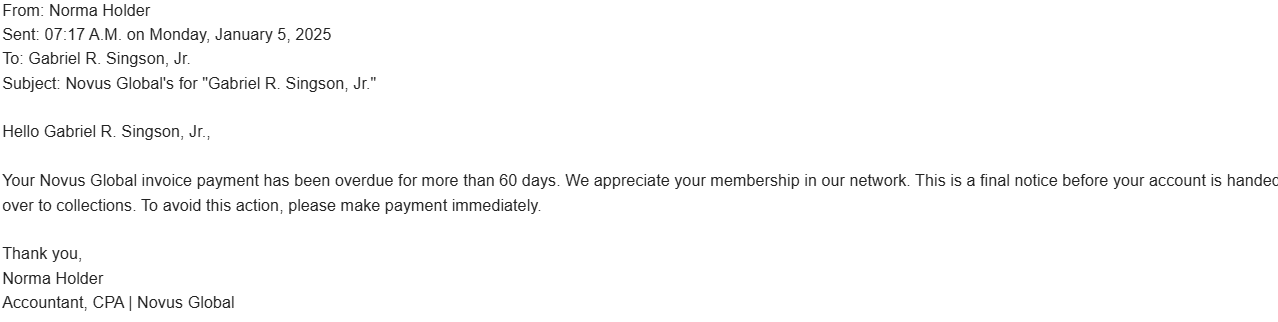
1. Fake Bills (Phishing)
One of our units (GRS) received an email about a late bill from a company called "Novus Global." When we checked, we found we don't even do business with them. The scammers were just hoping someone would get scared and pay the "overdue" money quickly without checking.
2. Fake Bank Texts (Smishing)
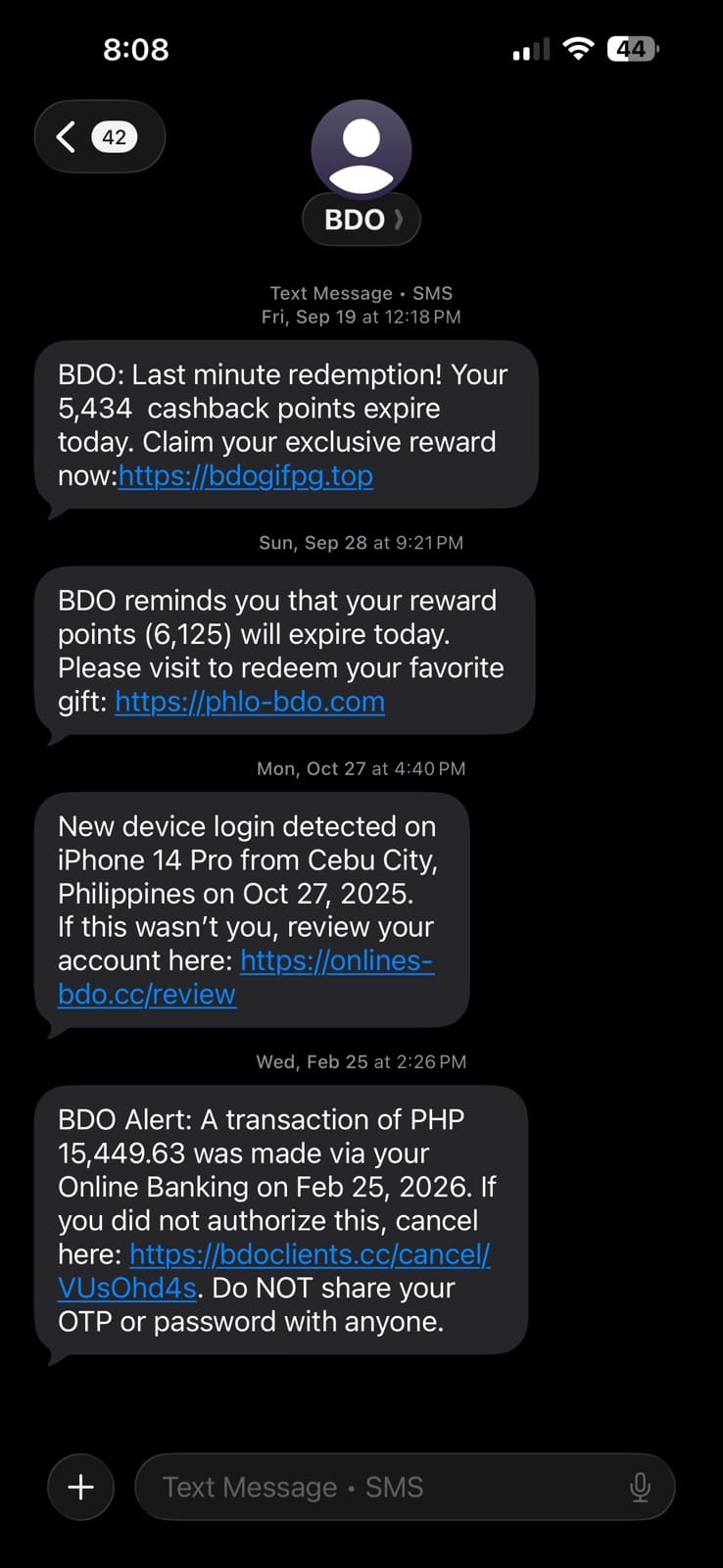
I’ve personally received texts claiming to be from "BDO." They use scary messages—like saying your account was hacked or your points are expiring—to get you to click a link. These links lead to fake websites that steal your login details.
Voice Scams — When AI Mimics People You Know
Scammers can now use "AI Voice Cloning." This means they can take a very short recording of someone's voice and use a computer to make that person say anything. It sounds exactly like them.
What to watch out for: A scammer might call you sounding exactly like your boss or a coworker, asking you to send money or share a password.
Click below to hear examples of how realistic these AI voices can be:
How to beat Voice Scams
Ask a Personal Question: Ask the caller something only the real person would know, like "What did we eat for lunch yesterday?"
Hang Up and Call Back: If a call feels suspicious, hang up and call the person back using the number saved in your contacts—not the number that just called you.
New Rule: Lock Your Computer
We are introducing a simple rule to keep our office safe: Always lock your screen before you walk away from your desk. Even if you are just grabbing a coffee, an open computer is a big risk.
Windows (PC): Press the Windows Key + L
Mac (Apple): Press Command + Control + Q
Stay Vigilant, Team!
Cybersecurity is everyone's responsibility. Scammers are getting smarter every day, so let's keep our guard up. If something feels "off" or too good to be true, it probably is. When in doubt, don't click—ask IT first!